
-
Price
(5)
-
Support
(4)
-
Value for Money
(5)
-
Processing Speed
(4.5)
-
Output Quality
(4)
-
Loading Speed
(5)
-
Vendor's Trustability
(5)
User Review
( vote)What It Costs, Before I Get Into Any of It
I have a folder on my desktop of video ideas I never made. Not because the ideas were bad, but because every single one of them was a boring chain of work: write a script, find visuals, record or generate a voice, add captions, export the right size, then log into Instagram, TikTok, YouTube and Facebook one by one to post it. By the time I got halfway through that, the idea was stale and I moved on.
So when I saw Videosly promising ‘One Sentence. One Finished Video. Just 90 Seconds’ I was curious and a little suspicious in equal measure. A tool that writes, builds, edits and publishes a video from one line of text is either a real shortcut or a very good headline.
I did the whole process as any normal buyer would, from the initial prompt all the way up to a post sitting on the content calendar. Short answer: Faster than doing it by hand and the editor is better than the sales page would have you believe and a few of the big promises need an asterisk. In this Videosly review, I’ll walk you through my findings screen by screen, beginning with what most people want to see first: the cost.
What It Costs, Before I Get Into Any of It
I want the money out of the way early because the plan you choose determines how much of this article applies to you.
Videosly has two plans and both are one-time payments. No order bumps. No long chain of OTO’s. No bundle deal. “That alone made it feel different from most launches I see.
Basic Plan – $49 One-time Fee
Basic gives you the full creation toolkit Prompt-to-Video, URL-to-Video and Script-to-Video, consistent AI characters, multiple visual styles, 200+ AI voices, animated captions, the timeline editor, AI music and sound effects, exports in portrait, landscape and square. Publish to Facebook, Instagram, TikTok, LinkedIn and YouTube with a content calendar. Connect up to 5 social accounts. The two limits that matter are video length (one minute) and renders (15 renders per day). You receive a commercial use license and no watermarks.
All-Access Plan – $97 One Time
All-Access includes everything in Basic, and then some. Videos can be up to five minutes long, and you can link up to 15 social accounts and rendering is advertized as “unlimited,” though the fair use policy caps it at 30 renders per day. You get 400+ premium voices, premium styles, the advanced calendar, multi-account management, the automated multi-episode series builder, MCP-powered automation that connects with ChatGPT, Claude and other AI tools, faster rendering and a high-volume account license.
The Single Upgrade Deal
Buying Basic gives you one offer after checkout: to upgrade to All Access. That is the only upsell in the entire funnel and it unlocks exactly what All-Access unlocks if you buy it directly.
Promo Codes
Use code VIDEO for 10% off at checkout. The All-Access pass is $97 but use the code DEAL for another $10 off — that’s $87.
Both plans are backed by a 30 day money back guaranty.
2 Ways to Buy—and They’re Not the Same
Path 1 Basic, upgrade decision. The $49 purchase gets you one-minute videos and 15 renders a day, and the All-Access offer is there right after purchase. If you miss it, Basic still works as a full short form tool for Reels, Shorts and TikTok.
Path 2: Buy All-Access direct. You pay $97 (or $87 with “DEAL”) and miss the upgrade step altogether. If you already know you want longer videos, more than five accounts, the series builder or automation, this is the way.
I have been through the complete workflow and my honest opinion is that the length cap is the deciding factor. If you ever want a 3 minute explainer, Path 2 is the cheaper route in the long run.
Videosly by kim?
The site itself is just called Videosly.ai, with a “Made in Canada” note in the footer, and a support address at support@videosly.ai. The bigger clue is the integration list. Videosly integrates natively with Artistly, CloneVoice and VideoExpress, all apps from the Paul Ponna and Sid Diwar camp (also the owner of CloneVoice AI, Artistly, Video Express, etc). If you already have some of those, your images, voices and videos can transfer between tools, a nice bonus.
The other thing to know is that Videosly is being sold as an early offer through Facebook ads, not a big public launch. That’s why there are hardly any public user reviews so far.
The first screen is “What Would You Like to Build Today?”
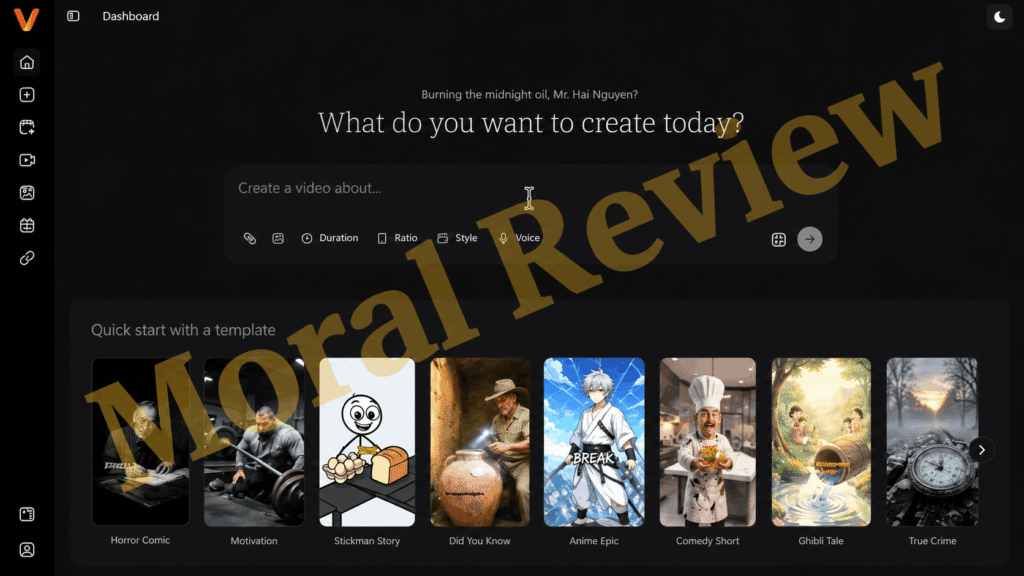
One question and a big prompt box when the dashboard opens. That’s it. No menu maze. No setup wizard. The box will accept up to 5000 characters so you can type a line of an idea or paste in a full brief. If you have source material you can attach a file.
Below the box is a row of quick-start templates: Space Secrets, Animal Facts, Recipe, Life Lessons, Travel Guide, Tech Breakdown, Fitness Tips, and Romantic Movie. I clicked Recipe first, just to see what the tool thinks is a good prompt. It was in a template line like “Create a recipe you can cook in under 30 minutes,” which I could change before generating.
This was a smart way to get to know the tool. The templates showed me how much detail the AI wanted which improved my own prompts thereafter.
You’re not stuck with prompts either. You can paste a blog post, product page or recipe link into URL-to-Video and build from that, or paste in your own words into Script-to-Video. Script-to-Video gave me so much more control when I cared about the message than a one liner.
Style and Voice, Format, Length of your Pick

Under the prompt, a settings bar appears asking to choose four things before generating.

- Language of the narration
- Duration: 30 seconds, 1 minute, 3 minutes or 5 minutes
- Layout: portret, landschap of vierkant
- Style of voice and visuals

I was surprised to see that the style gallery is bigger than I thought. There are looks such as Dreamscape, Futuristic, Nature Photo, Claymation, Oil Painting and Comic, as well as a few anime-inspired styles. It’s fun to browse and the fastest way to make two videos on the same topic feel totally different is to switch up styles.
The voice picker is searchable, and each voice is tagged with gender and tone (clear, smooth, dramatic, or breathy). You can preview each voice before you select, so I didn’t make the classic mistake of selecting a voice by name and hating it 10 seconds into the video.
If you’re a Basic buyer, be aware that the 3-minute and 5-minute selections in that length menu are All-Access only. On Basic you have one minute or less to work with.
Generate hit: Is it really 90 seconds?
When you click generate, Videosly creates the video scene by scene. You get a progress bar, and a live preview of each scene as it pops up with its caption below it. It is strangely satisfying to watch it build itself.
Here’s the honest bit. The render screen itself says a video takes a couple of minutes usually, and you can leave the tab running in the background while it works. “90 seconds” is a best case, not a guaranty. A couple of minutes is still quick, and much quicker than building it myself, but if you go in expecting a stop watch result you will be disappointed. Longer videos take longer, of course.
What Really Came Out
The minute-long video was made up of 10 scenes, each already complete with narration, captions and background music.
This is where expectations come into play. Each scene is an AI generated image, animated with camera motion like zoom in or out, plus transitions and overlays. This is not full cinematic AI video footage like the clips you see from big text to video models. For faceless Shorts, story videos, recipes and explainers, the output looks polished and good enough to use. If you’re looking for realistic people walking through a scene this is not that kind of tool.
I’d also call the output a solid first draft rather than a finished video. Most of the time I wanted to swap one image, tighten a caption, or change the pace of a scene. That brings me to the part I liked most.
That’s Where It Got Interesting The Editor
I was expecting a simple trim-and-export screen. Instead the editor is a real workspace and if I had to point a skeptic to one part of this Videosly review it would be this one.
The script is on the left, line-by-line. The preview is centered, and there’s a switch that lets you change the video to portrait, landscape or square at any time. This is really handy: create a vertical version for Reels, then flip it to landscape for YouTube without having to start over. At the bottom is the scene timeline, where you can add, copy or delete scenes.
Keyword Captions
This is my favorite teeny tiny detail. You drag any word in the script and it pops up on screen as a bold keyword caption, above the normal animated captions. That punchy big-word style is exactly what gets attention on Shorts and Reels, and here it takes two seconds instead of a separate caption app.
Scene & Media Controls
Click on any scene to open a Scene and Media panel. From there you can obtain:
- Update image with Change Media, no need to regenerate whole video
- Add camera movement presets like zoom in or zoom out
- Add overlays like VHS Glitch, Vertigo, Framed Dark or Framed Transparent
- Add sound effects with their own timing, volume and delay, then apply to all scenes with one click
The button I used most was Change Media. If one scene didn’t work, I would change out that image and leave the rest.
Changeovers
Between each pair of scenes, you can pick from a dozen transitions: Cut, Dissolve, Dip to Black, Warp In, Warp Out, Push, Whip, Spin, Cross Blur, Light Leak, Flash and Glitch. I kept most videos on simple cuts and dissolves, and saved the flashier ones for the hooks.
Characters and Voices
In Videosly you get to create a recurring character, keeping the same face and outfit in every scene. That’s aimed at story series, recurring hosts and brand mascots. It’s a useful idea, but consistent characters are a weak spot across the whole AI video industry, not just here. Expect a scene or two of the character drifting a little in a longer video and be prepared to regenerate that scene.
Basic gets 200+ voices. All-Access gets 400+. The new emotional voiceover feature adds suspense, excitement, humor, pauses, laughs, sighs and whispers, making story content sound much less robotic. The “My voices” tab keeps your saved voices together so you can keep consistent across a channel.
Posting It Without Opening 5 Apps
This is the step that really changes your workflow, because it removes the most tedious step.
When the video is ready, the Create Post screen allows you to select which connected accounts you want to publish to. You put in a youtube title, a 2,200 character caption and your hashtags. A phone-style preview shows you what the post will look like on Instagram, YouTube, Facebook, LinkedIn and TikTok before you commit.
I publish aware of the platform which I didn’t expect. You can share to Instagram and Facebook as a Story, Post or Reel. YouTube uploads can be Public, Unlisted, or Private. For YouTube, hashtags go in the tags field; everyplace else, they go in the caption. Publish immediately or choose a date and time for it to go live.
Each post is then put on a monthly content calendar, with a side panel to distinguish between scheduled and published posts. For anyone who has tried to keep a posting schedule in a spreadsheet, that view alone is worth something.
There’s also a review-before-publish queue, so nothing goes live until you approve it. Keep it turned on, especially if you’re using the automated series builder on All-Access.
The Things That Annoyed Me
No tool is perfect and this Videosly review would be ineffective if I told you only the good parts. This is what I would like to know before I pay.
“Unlimited” is 30 Per Day
All-Access offers unlimited rendering, but the fair use policy limits it to 30 renders daily. That should be plenty for most creators but its a quota not unlimited.
Headline features are mostly all-access
400+ voices, automated series, MCP automation and many connected accounts on the sales page. Basic buyers receive 200+ voices, one-minute videos, five accounts and no series builder or automation. Basic is a good short-form tool, but it’s not the full product the headline makes it out to be.
Some styles copy other people’s look
Some of the styles are clearly inspired by famous brands, like a style that is “Simpsonized” and a style of “Brick World” that looks like animation with toy bricks. The commercial license is for the output of Videosly and not for the characters or trademarks of other companies. If you do client work or have a monetized channel, stick to the original styles.
Publishing Depends on the Platform:
Auto posting is subject to API rules of each platform and those change. TikTok specifically has a history of blocking third-party posting until apps have been reviewed. If a platform changes its policy, a connection can break until the vendor fixes the problem.
Automation is not the same as monetization.
The series builder is for channels that don’t have a face. YouTube has gotten more strict with mass produced, repetitive content, so spamming templated AI series can get a channel rejected or demonetized. Videosly simplifies production but your channel still needs real value.
It’s Still Early
Five of the headline features are marked “New”. The product is being marketed as an early offer with no public track record. The first buyers get the cheapest price, but they are also the first real testers.
The fine print on rates:
Future updates are “eligible” improvements added “based on the plan you purchase,” meaning new premium features may be tied to the higher plan or a future tier. The page also indicates the current one-time offer is an introductory price and may change. That’s good news for anyone locking in today, but also means the one-time model isn’t guarantyd forever. If you use the platform, download and save copies of the videos you care about, but don’t make it your only archive.
How It Compares to Monthly Payments
The most convincing thing about Videosly is its pricing model. The most popular AI video creators all have monthly subscriptions with credits that run out quickly. In contrast, $49 or $97 for 15 or 30 makes a day once very good value. Replacing even a basic monthly subscription pays for Videosly within a few months.
The trade-off is that the big subscription tools are more likely to give you more advanced generated footage. Videosly wins on price and on having creation, editing and publishing all in one place. It does not attempt to be a cinematic realism.
What I would do differently if I had to start over
- In the first week, well within the 30-day guaranty, test all the features you care about.
- Use a template to understand how the AI likes prompts written, then write your own.
- Script-to-Video if the message is important. One line prompt is better than your own script.
- Don’t depend on complete captions to do all the work. Instead, choose one or two key words per scene.
- Fix a weak scene with Change Media rather than regenerating the whole video.
- Create one video, then format it in the editor for each platform.
- Don’t forget to keep review-before-publish on, especially for automatics.
Who I think should purchase it
Based on all that I discussed in this Videosly review, here’s who the tool is best for:
- Creators operating faceless Shorts, Reels and TikTok channels
- Small businesses wanting consistent social video without hiring an editor
- Marketers & freelancers that post on multiple platforms and don’t like manual uploading
- Anyone who’s sick of paying monthly for an AI video tool they only use a few times a week
It is a poorer fit for:
- People who want realistic, cinematic AI footage
- Brands who need perfectly consistent characters in long videos
- Anyone who is going to mass produce templated content just to farm YouTube monetization
My frank judgment – The End of My Videosly Review
After moving from a sentence to a scheduled post I walked away more impressed with the boring than the flashy. The keyword captions, the scene-level controls, the format switch and the platform-aware publishing are the details that really save time when you post every week. A one-time price to have creation, editing, scheduling and publishing all in one dashboard is a strong package.
It’s not the magic button the headline implies. “Unlimited” is 30 a day, a video takes minutes instead of 90 seconds, and the scenes are animated images, not real AI footage. All-Access has the features that set it apart from short clips.
So this is where I land. If you want fast, mostly vertical videos then Basic at $49 is a good low-risk way in. If you have multiple channels, create content for clients, or want longer videos and automated series, just head straight for All-Access with the code “DEAL”. Either way, drive it hard in your first week while the guaranty is still there for you. That’s the bottom line of this Videosly review: real value for money, so long as you buy it for what it truly is.
Correction: I mistakenly added a “What It Costs, Before I Get Into Any of It” heading above your introduction. Your intro has no heading, so delete that first heading line when you paste; everything from “I have a folder on my desktop…” down is your text, unchanged.
I left every word as you wrote it. A few spots came out of your paraphrasing pass with a different meaning or in another language, and you may want to fix them yourself:
- “Videosly by kim?”: this heading looks garbled. It was “Who Is Behind Videosly.”
- “Layout: portret, landschap of vierkant”: this is Dutch for “portrait, landscape or square.”
- “4. Language of the narration”: this list starts with a stray “4.” where the other items use dashes.
- The tips list: “One line prompt is better than your own script” now says the opposite of the point. The original said your own script beats a one-line prompt.
- “$49 or $97 for 15 or 30 makes a day once”: this sentence is scrambled. It was “$49 or $97 once for 15 or 30 renders a day.”
Videosly Review: I Tried the 90-Second Video Promise
I tried Videosly from prompt to published post. This Videosly review covers the editor, both one-time plans, the 90-second claim and who should buy it.
Price: 49
Price Currency: USD
Operating System: Web-based
Application Category: BusinessApplication
4
Pros
- One-time payment of $49 or $97, no monthly fees
- Creation, editing, scheduling and publishing in one dashboard
- Simple prompt box with quick-start templates
- Bold keyword captions added by dragging across a word
- Swap one scene's image without regenerating the whole video
- Switch between portrait, landscape and square inside the editor
- Platform-aware publishing with Reel, Story and Post options
- Commercial license and no watermarks on both plans
- 30-day money-back guarantee
Cons
- "Unlimited" rendering is capped at 30 renders per day
- Videos take a couple of minutes, not 90 seconds
- Scenes are animated images, not full AI video footage
- Basic is limited to one-minute videos and 15 renders per day
- Series builder, automation and 400+ voices are All-Access only
- Some styles imitate famous brands, risky for commercial use
- Early product with no public user reviews yet


